Save & analyze watch window snapshots (.pvm)
A watch window (variable monitor) shows live process-variable values while you’re connected to a PLC. Less obviously, saving a watch configuration also snapshots the current values — so a single .pvm file is both a reusable variable list and a machine-state capture you can archive, hand off, or diff offline. This guide covers saving a snapshot and analyzing it offline with a few small Python scripts.
Objective
Save a watch window snapshot that captures live variable values, then search or diff those snapshots offline as JSON — with no live connection to the machine.
Prerequisites
- Automation Studio with an online connection to the target (a real PLC or ARsim) — values are only captured while connected. The watch window (variable monitor) is a standard diagnostics tool in AS 4.x and 6.x.
- For offline analysis: Python 3.8+ (standard library only — no third-party packages). The scripts you need are included below, so there’s nothing to install or clone.
Save a watch window snapshot
1. Open a watch window
Open the Logical View, right-click the task you want to inspect, and select Open / Watch (or press Ctrl + W).
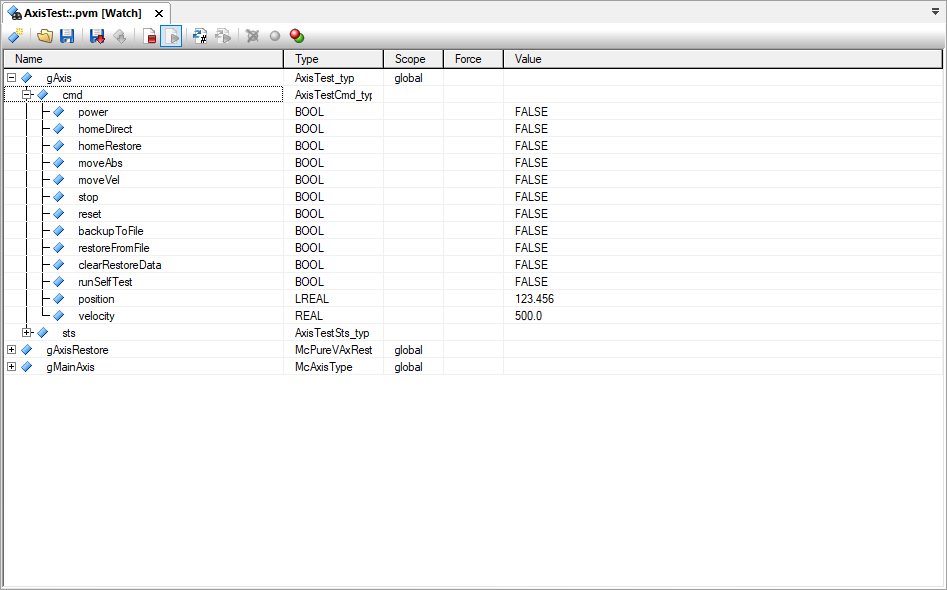
2. Add the variables you need
Click the Insert variable toolbar icon and pick variables from the dialog, or drag them in from the programming editor.
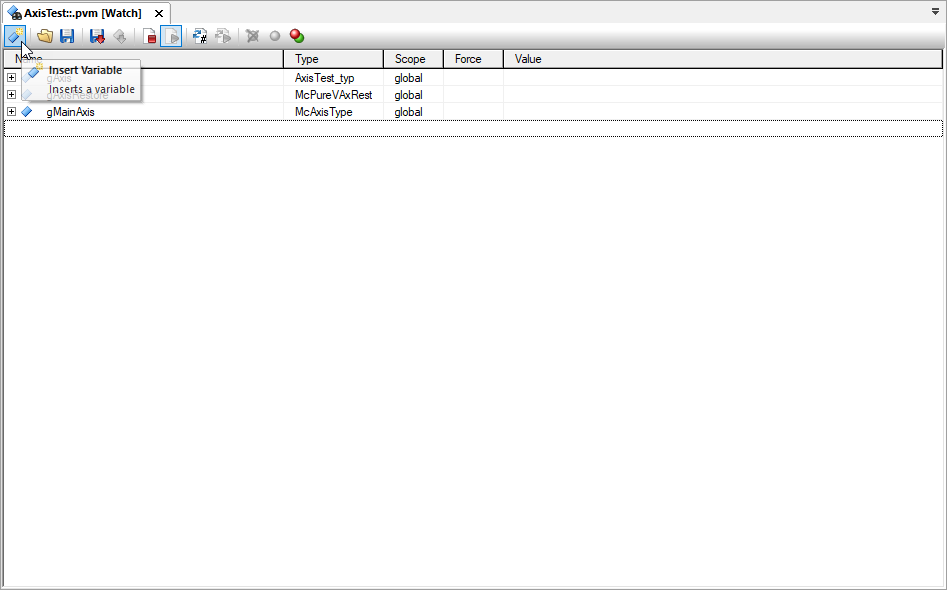
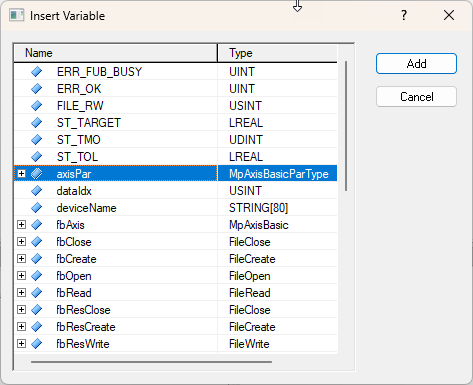
3. Expand and scroll the values into view
Go online so live values appear in the Value column, then expand every structure and array whose values you need and make sure each row is scrolled through the visible area at least once. Reading a row is what refreshes its value — per B&R’s documentation, “the variable values of the configuration are not completely updated before saving … no or outdated values are saved for variables that are outside the visible area of the watch window when saving.”
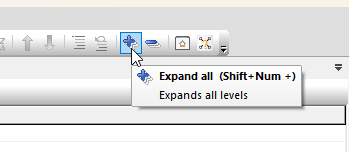
The quickest way to do this is the Expand All button on the watch window toolbar (or Shift + Num +), which opens every structure and array at once. Click it, then scroll from top to bottom so every row passes through view before you save.
4. Save the configuration
Click Save Watch configuration (disk icon) in the toolbar, or use Watch / Save Watch configuration. Enter a name for the snapshot (or select an existing one to overwrite).
The file is written to the project’s Diagnosis folder:
<ProjectPath>\Diagnosis\<Configuration>\<PCCName>\<Name>.pvm
It is a plain-text table of each variable’s name, type, and value at the moment of saving.
A * in the value column is normal for a structure or array — a non-primitive node has no scalar value of its own, so it shows * whether or not you expanded it. A * only signals a missing value when it lands on a primitive (a leaf such as INT, BOOL, or REAL): that means the value wasn’t read before saving, because the variable was collapsed inside a parent or scrolled out of view. Those are the values you’ll be missing offline.
name                       type                 value
axisPar                    MpAxisBasicParType   "   *"       <- structure: no scalar value of its own (normal)
  Position                 LREAL                "123.456"    <- primitive, expanded & visible: value captured
  Velocity                 REAL                 "500.0"      <- primitive, expanded & visible: value captured
Jog                        MpAxisJogType        "   *"       <- structure: normal
  Velocity                 REAL                 "   *"       <- primitive, not scrolled into view: value NOT captured
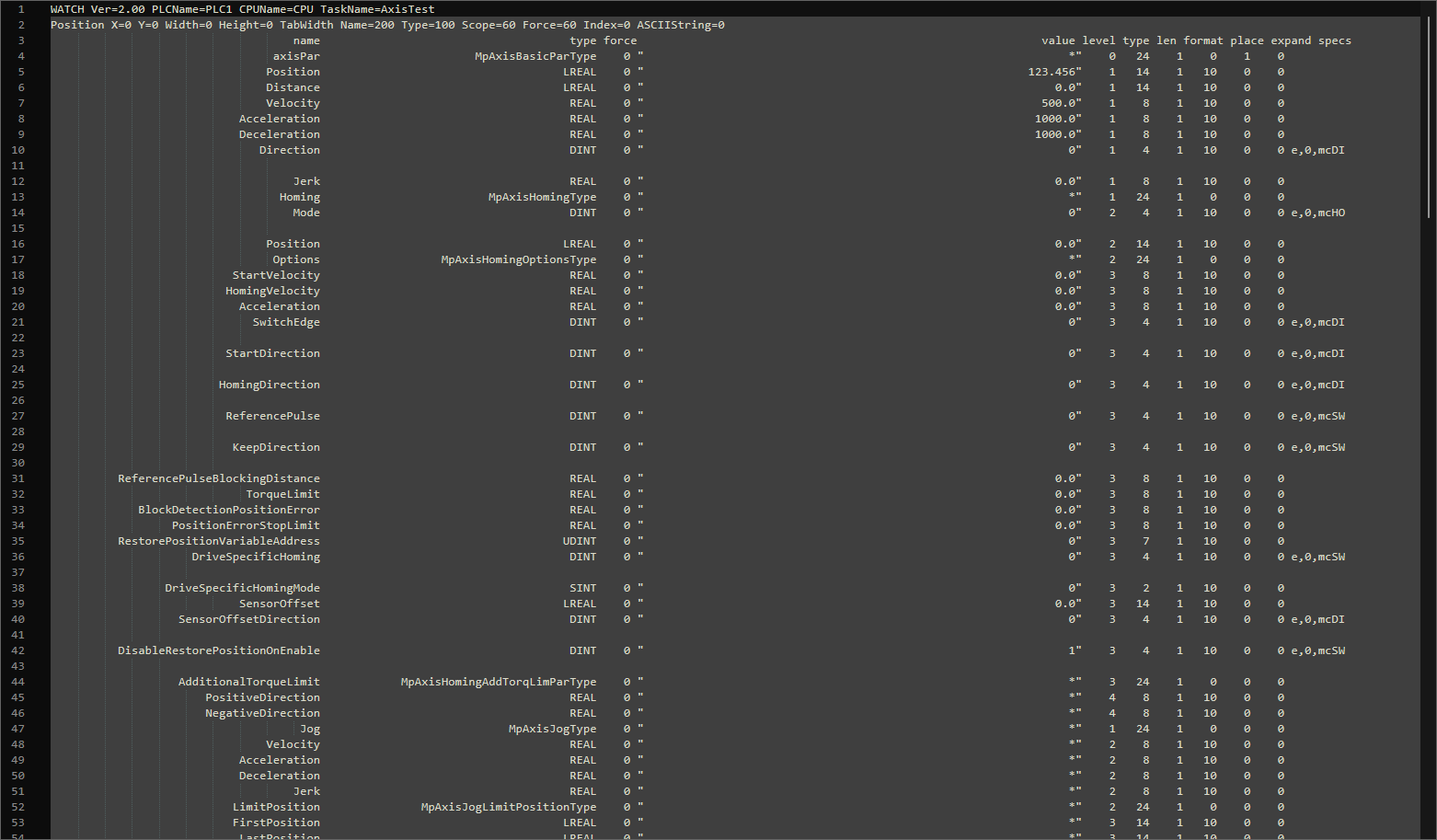
Capturing multiple snapshots. Because each save records a point-in-time snapshot, capturing values before and after a debugging event is just a matter of re-saving with a distinct name — same watch layout, multiple files to diff later:
AxisTest before restore.pvm
AxisTest after restore.pvm
Analyze the snapshot offline
You don’t need a live connection — or the original project — to read a .pvm. The Python scripts below (standard library only, Python 3.8+) turn one into searchable JSON. Save them anywhere and run them from the folder that holds your .pvm files.
1. Convert the .pvm to JSON
python pvm_to_json.py AxisTest.PVM
Writes AxisTest.json next to the input. Run it with no arguments to convert every *.pvm in the current folder; add --full to include each variable’s IEC type. A * on a leaf becomes null in the JSON.
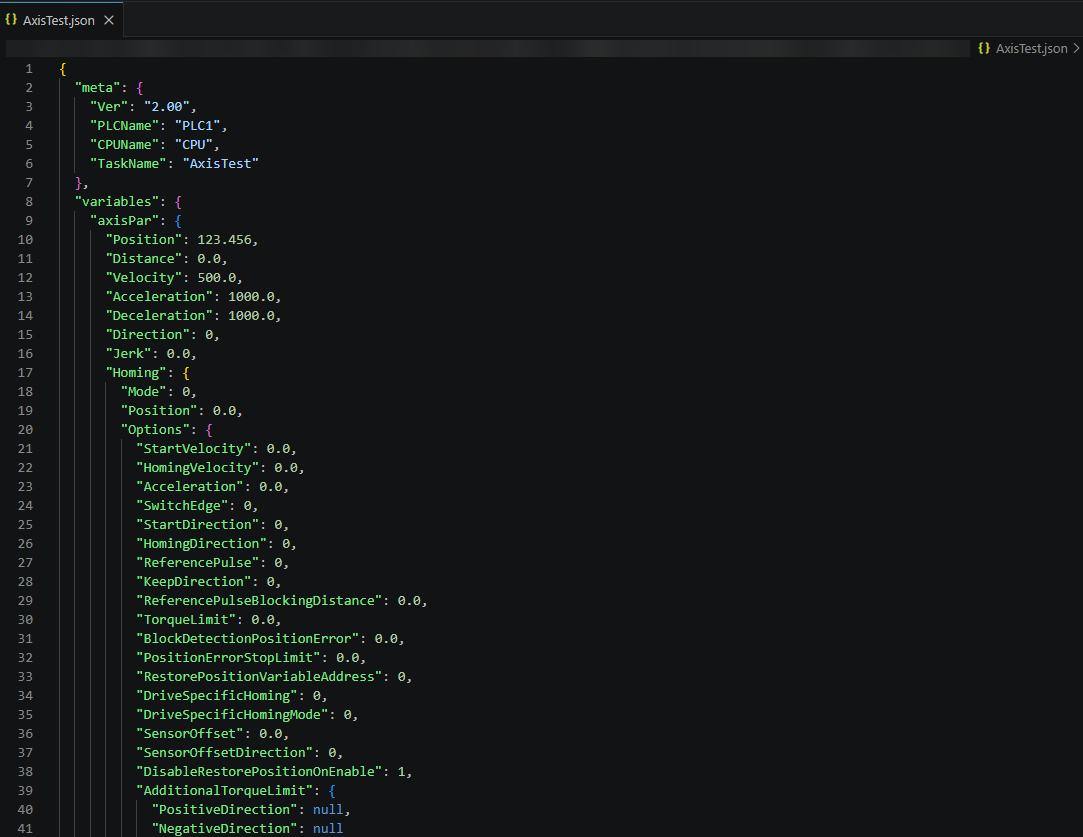
pvm_to_json.py
#!/usr/bin/env python3
"""Convert B&R Automation Studio watch-window PVM files to JSON.

A PVM file is a whitespace-separated dump of a watch window:
  - Line 1: WATCH header (Ver, PLCName, CPUName, TaskName, ...)
  - Line 2: window Position/layout info (ignored)
  - Line 3: column header (name, type, force, value, level, ...)
  - Remaining lines: one variable per line. A value of "*" on a row whose
    `level` is followed by deeper rows means the row is a structure (or
    array) and its members follow. A "*" on a leaf means the value was not
    captured/expanded in the watch window -> emitted as null.

Array members appear as `name[0]`, `name[1]`, ... nested under a row whose
type is e.g. `DINT[0..99]`; these are collapsed into JSON arrays.

Usage:
    python pvm_to_json.py                  # convert every *.pvm in cwd
    python pvm_to_json.py file1.pvm ...    # convert specific files
    python pvm_to_json.py --full ...       # include type/force metadata per node
    python pvm_to_json.py -o out.json f.pvm  # explicit output (single input only)
"""

import argparse
import json
import re
import sys
from pathlib import Path

# name  type  force  "value"  level typecode len format place expand [specs]
ROW_RE = re.compile(
    r'^\s*(?P<name>\S+)'
    r'\s+(?P<type>\S+)'
    r'\s+(?P<force>\d+)'
    r'\s+"(?P<value>.*)"'
    r'\s+(?P<level>\d+)'
    r'\s+(?P<typecode>\d+)'
    r'\s+(?P<len>\d+)'
    r'\s+(?P<format>\d+)'
    r'\s+(?P<place>\d+)'
    r'\s+(?P<expand>\d+)'
    r'\s*(?P<specs>\S*)\s*$'
)

ARRAY_ELEM_RE = re.compile(r'^(?P<base>.+)\[(?P<index>\d+)\]$')

NUM_RE = re.compile(r'^-?\d+$')
FLOAT_RE = re.compile(r'^-?\d*\.\d+([eE][+-]?\d+)?$|^-?\d+[eE][+-]?\d+$')


def convert_value(raw):
    """Convert the quoted value field to a native JSON value."""
    v = raw.strip()
    if v == '*':
        return None  # not captured / structure placeholder
    if v.startswith("'") and v.endswith("'"):
        return v[1:-1]
    if v == 'TRUE':
        return True
    if v == 'FALSE':
        return False
    if NUM_RE.match(v):
        return int(v)
    if FLOAT_RE.match(v):
        return float(v)
    return v


def parse_watch_header(line):
    """Parse `WATCH Ver=2.00 PLCName=PLC1 ...` into a dict."""
    meta = {}
    for key, val in re.findall(r'(\w+)=(\S+)', line):
        meta[key] = val
    return meta


def parse_rows(lines):
    """Yield parsed row dicts, skipping headers and blank wrap lines."""
    for lineno, line in enumerate(lines, 1):
        if lineno <= 3 or not line.strip():
            continue
        m = ROW_RE.match(line)
        if not m:
            raise ValueError(f'line {lineno}: unrecognized row: {line!r}')
        yield {
            'name': m['name'],
            'type': m['type'],
            'force': int(m['force']),
            'value': convert_value(m['value']),
            'level': int(m['level']),
        }


def build_tree(rows, full=False):
    """Build a nested dict from the flat row list using the level column.

    Each node starts as a dict with bookkeeping keys; finalize() collapses
    leaves to plain values and groups `name[i]` children into arrays.
    """
    root = {'children': [], 'name': '<root>'}
    stack = [root]  # stack[i] is the open node at level i-1

    for row in rows:
        level = row['level']
        # pop back to the parent of this level
        if level + 1 > len(stack):
            raise ValueError(
                f"row {row['name']!r}: level {level} jumps past current depth "
                f'{len(stack) - 1}'
            )
        del stack[level + 1:]
        node = {**row, 'children': []}
        stack[level]['children'].append(node)
        stack.append(node)

    return finalize(root, full)['value'] if root['children'] else {}


def finalize(node, full):
    """Recursively collapse a node to {'name': ..., 'value': json-ready}."""
    children = node.get('children', [])
    if not children:
        value = node['value']
        if full:
            value = {'type': node['type'], 'value': node['value']}
            if node['force']:
                value['force'] = node['force']
        return {'name': node['name'], 'value': value}

    done = [finalize(c, full) for c in children]

    # array? all children named like parent[index]
    base = node.get('name')
    indices = []
    for c, raw in zip(done, children):
        m = ARRAY_ELEM_RE.match(raw['name'])
        if m and (base in ('<root>',) or m['base'] == base):
            indices.append(int(m['index']))
        else:
            indices = None
            break
    if indices is not None and base != '<root>':
        arr = [None] * (max(indices) + 1)
        for idx, c in zip(indices, done):
            arr[idx] = c['value']
        value = arr
    else:
        value = {}
        for c in done:
            name = c['name']
            if name in value:
                # duplicate sibling name: keep both by suffixing
                n = 2
                while f'{name}~{n}' in value:
                    n += 1
                print(f'warning: duplicate member {name!r}, stored as '
                      f'{name}~{n}', file=sys.stderr)
                name = f'{name}~{n}'
            value[name] = c['value']

    if full and node.get('type'):
        value = {'type': node['type'], 'value': value}
    return {'name': node.get('name', '<root>'), 'value': value}


def convert_file(path, full=False):
    lines = Path(path).read_text(encoding='utf-8', errors='replace').splitlines()
    if not lines or not lines[0].startswith('WATCH'):
        raise ValueError(f'{path}: does not look like a PVM file '
                         f'(missing WATCH header)')
    meta = parse_watch_header(lines[0])
    rows = list(parse_rows(lines))
    return {
        'meta': meta,
        'variables': build_tree(rows, full=full),
    }


def main():
    ap = argparse.ArgumentParser(
        description='Convert B&R watch-window PVM files to JSON.')
    ap.add_argument('files', nargs='*',
                    help='PVM files to convert (default: all *.pvm in cwd)')
    ap.add_argument('--full', action='store_true',
                    help='include type (and force, when set) metadata per variable')
    ap.add_argument('-o', '--output',
                    help='output file (only valid with a single input; '
                         'default: <input>.json next to each input)')
    args = ap.parse_args()

    files = [Path(f) for f in args.files]
    if not files:
        files = sorted(Path('.').glob('*.[pP][vV][mM]'))
        if not files:
            ap.error('no PVM files given and none found in current directory')
    if args.output and len(files) > 1:
        ap.error('-o/--output requires exactly one input file')

    for path in files:
        result = convert_file(path, full=args.full)
        out = Path(args.output) if args.output else path.with_suffix('.json')
        out.write_text(json.dumps(result, indent=2) + '\n', encoding='utf-8')
        print(f'{path} -> {out}')


if __name__ == '__main__':
    main()
2. Flatten for quick searching
python flatten_json.py AxisTest.json
Produces a *.flat.json with one variable per line, keyed by full dotted path — open it in VS Code and Ctrl + F for any variable:
{
"axisPar.Velocity": 500.0,
"gAxis.sts.homed": true,
"gAxis.sts.actPosition": 123.456,
"gMainAxis.controlif": null
}
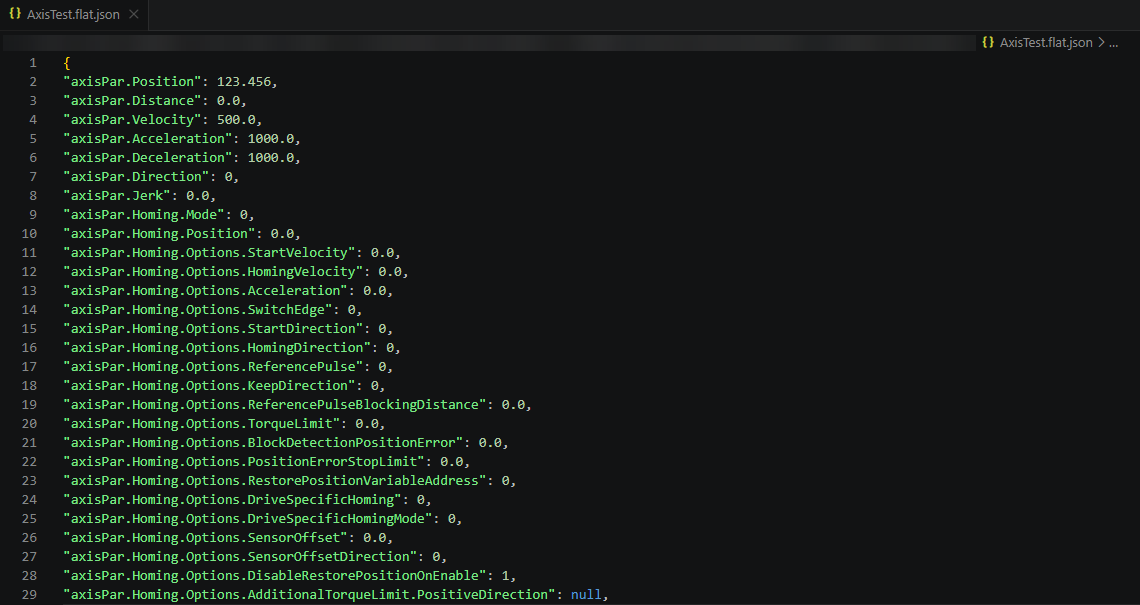
flatten_json.py
#!/usr/bin/env python3
"""Flatten PVM-derived JSON files for easy searching in an editor.

Turns the nested `variables` tree into a flat object keyed by dotted path,
one variable per line:

    {
      "axisPar.Velocity": 500.0,
      "gAxis.sts.homed": true,
      "gAxis.sts.actPosition": 123.456,
      "gMainAxis.controlif": null,
      ...
    }

Usage:
    python flatten_json.py                 # flatten every *.json in cwd
    python flatten_json.py file.json ...   # flatten specific files

Output is written next to each input as <name>.flat.json. Already-flattened
files (*.flat.json) are skipped.
"""

import argparse
import json
from pathlib import Path


def flatten(node, prefix=""):
    if isinstance(node, dict):
        for k, v in node.items():
            yield from flatten(v, f"{prefix}.{k}" if prefix else k)
    elif isinstance(node, list):
        for i, v in enumerate(node):
            yield from flatten(v, f"{prefix}[{i}]")
    else:
        yield prefix, node


def main():
    ap = argparse.ArgumentParser(
        description="Flatten PVM-derived JSON to one dotted path per line.")
    ap.add_argument("files", nargs="*",
                    help="JSON files to flatten (default: all *.json in cwd)")
    args = ap.parse_args()

    files = [Path(f) for f in args.files]
    if not files:
        files = [f for f in sorted(Path(".").glob("*.json"))
                 if not f.name.endswith(".flat.json")]
        if not files:
            ap.error("no JSON files given and none found in current directory")

    for f in files:
        if f.name.endswith(".flat.json"):
            print(f"{f.name}: already flat, skipping")
            continue
        data = json.loads(f.read_text(encoding="utf-8"))
        tree = data.get("variables", data)  # accept raw or {meta, variables}
        flat = dict(flatten(tree))
        out = f.with_name(f.stem + ".flat.json")
        body = json.dumps(flat, indent=0)  # one "path": value per line
        out.write_text(body + "\n", encoding="utf-8")
        print(f"{f.name} -> {out.name} ({len(flat)} variables)")


if __name__ == "__main__":
    main()
3. (Optional) Query from the command line
Prefer the terminal? find_var.py searches a snapshot by exact path, substring, or wildcard, and can diff a variable across every snapshot in the folder:
python find_var.py gAxis.sts.homed AxisTest.json      # exact path
python find_var.py actPosition AxisTest.json          # substring, case-insensitive
python find_var.py "gAxis.sts.stPos*" AxisTest.json   # wildcard
python find_var.py gAxis.sts.homed --all              # diff across every *.json
find_var.py
#!/usr/bin/env python3
"""Look up variables in PVM-derived JSON files by (partial) dotted path.

Flattens each JSON file to dotted paths (e.g. gAxis.sts.homed) and
prints every path that matches the query. Matching is case-insensitive:
  - exact path        gAxis.sts.homed
  - substring         actPosition, position
  - wildcards         gAxis.sts.stPos*, axisPar.*

Usage:
    python find_var.py gAxis.sts.homed AxisTest.json
    python find_var.py "gAxis.sts.stPos*" AxisTest.json
    python find_var.py actPosition --all               # search every *.json in cwd
"""

import argparse
import fnmatch
import json
from pathlib import Path


def flatten(node, prefix=""):
    if isinstance(node, dict):
        for k, v in node.items():
            yield from flatten(v, f"{prefix}.{k}" if prefix else k)
    elif isinstance(node, list):
        for i, v in enumerate(node):
            yield from flatten(v, f"{prefix}[{i}]")
    else:
        yield prefix, node


def find_hits(pairs, query):
    """Return matching (path, value) pairs. Exact full-path matches win;
    otherwise fall back to wildcard/substring matching."""
    q = query.lower()
    exact = [(p, v) for p, v in pairs if p.lower() == q]
    if exact:
        return exact
    if "*" in q or "?" in q:
        return [(p, v) for p, v in pairs
                if fnmatch.fnmatchcase(p.lower(), q)
                or fnmatch.fnmatchcase(p.lower(), f"*{q}*")]
    return [(p, v) for p, v in pairs if q in p.lower()]


def main():
    ap = argparse.ArgumentParser(
        description="Find variables in PVM-derived JSON files by dotted path.")
    ap.add_argument("query", help="full or partial dotted path; * and ? wildcards allowed")
    ap.add_argument("file", nargs="?", help="JSON file to search")
    ap.add_argument("--all", action="store_true",
                    help="search every *.json in the current directory")
    args = ap.parse_args()

    if args.all:
        files = [f for f in sorted(Path(".").glob("*.json"))
                 if not f.name.endswith(".flat.json")]
        if not files:
            ap.error("no *.json files found in current directory")
    elif args.file:
        files = [Path(args.file)]
    else:
        candidates = [f for f in sorted(Path(".").glob("*.json"))
                      if not f.name.endswith(".flat.json")]
        if len(candidates) == 1:
            files = candidates
        else:
            ap.error("specify a JSON file (or use --all to search every file):\n  "
                     + "\n  ".join(f.name for f in candidates))

    total = 0
    for f in files:
        data = json.loads(f.read_text(encoding="utf-8"))
        tree = data.get("variables", data)  # accept raw or {meta, variables}
        hits = find_hits(list(flatten(tree)), args.query)
        if hits:
            print(f"\n{f.name}:")
            for path, value in hits:
                print(f"  {path} = {json.dumps(value)}")
            total += len(hits)
    if total == 0:
        print(f"no match for {args.query!r}")


if __name__ == "__main__":
    main()
Verification
- The
.pvmexists in the Diagnosis folder and, opened in a text editor, shows real values (not*) for the primitive variables you expanded. - After conversion, the variable you care about has a real value in the JSON. A
nullon a leaf means the node was not expanded or visible when the snapshot was saved — the live PLC value was never captured, so it can’t be recovered from this file.
Troubleshooting
- A primitive shows
*(in the .pvm) ornull(in the JSON). It was collapsed or scrolled out of the visible area when the snapshot was saved. Expand it, scroll it into view, and re-save — the value can’t be recovered from the existing file. (A*on a structure or array is normal and needs no action.) - Keep captured data out of source control. Add
*.pvmand*.jsonto your.gitignoreso snapshots dropped into a working copy aren’t committed by accident; treat machine captures as confidential regardless.
Related
- B&R Help: Saving a configuration (GUID: df1b9fad-b6b7-408f-8015-837763828c01) and Watch window – General information (GUID: 0c01db60-35e6-49b8-a0a3-f517e64c2bcc).
- The scripts above are maintained in
loupeteam/pvm-tools(a private, Loupe-internal repo — not publicly browsable), which also includes averify_nulls.pysanity-checker and example files.