Set up X.509 certificates on a B&R PLC (OPC UA)
A B&R PLC uses X.509 certificates in two separate places on its OPC UA server:
- Application certificates secure the channel. The PLC and each client prove which application is at the other end, and sign or encrypt every message.
- User certificates log a user in, in place of a user name and password.
Out of the box, the PLC generates its own certificate and trusts every client certificate (B&R Help, OPC UA C/S configuration → Security), so the traffic can be encrypted but nobody’s identity is checked. This guide replaces that default with managed certificate stores, so that the PLC accepts only client applications and users you have trusted. It is independent of any one client. For a worked example with Node-RED, see Trigger Node-RED flows on B&R PLC variable changes.
The steps were tested on ARsim (AR 6.6.2, OPC UA C/S 6.6.1, AS 6.7) on 2026-10-09, with Python asyncua 2.0.1 and UaExpert as clients. Statements taken from B&R Help instead are marked “(B&R Help)”.
Objective
When you finish, the PLC will:
- Use its own certificate, generated on the PLC from a managed certificate store, for its OPC UA endpoints.
- Accept a SignAndEncrypt connection only from client applications whose certificates are in its TrustList, and refuse every other client with
BadSecurityChecksFailed. - Accept a login with an X.509 user certificate that you have trusted and mapped to a role, and refuse any other user certificate with
BadIdentityTokenRejected.
Prerequisites
-
Automation Studio 6.3 or later and Automation Runtime 6.3 or later, and the OPC UA C/S technology package at the version each feature needs (from the OPC UA C/S version information in B&R Help):
OPC UA C/S Adds 6.3 Managed certificate store as the application store, with GDS push management. It is the first standalone OPC UA C/S package and needs AS 6.3 and AR 6.3. 6.4 X.509 user certificate logins, and the ArMcsRecreateCertfunction block6.5 Role identities added at runtime are persisted -
OPC UA C/S enabled in
Connectivity/OpcUaCs/UaCsConfig.uacfg, with your variables published (see the Node-RED guide, steps 2 to 4). -
A role for your clients in
AccessAndSecurity/UserRoleSystem/Role.role, with the permissions they need under DefaultRolePermissions inUaDvConfig.uadcfg. -
A user with the role BR_SecurityAdmin in
User.user. Only this role can change trust lists and role identities at runtime. Create users in the AS user editor: AR 6 stores passwords as Argon2 hashes that only the editor writes, so do not editUser.userby hand. -
An OPC UA client that can call methods, for the runtime steps. This guide uses Python with
pip install asyncua. Any client with method calls works, such as UaExpert or a GDS.
How it works
| Application certificate | User certificate | |
|---|---|---|
| What it proves | Which client application opened the secure channel | Which user logs in to the session |
UaCsConfig.uacfg parameter |
Security → AppCertificateStore configuration | Security → Authentication → Authentication Methods → UserCertificateStore configuration |
| Certificate group in the server’s address space | ServerConfiguration/CertificateGroups/DefaultApplicationGroup |
ServerConfiguration/CertificateGroups/DefaultUserTokenGroup |
| How a certificate gets trusted | AddCertificate on that group’s TrustList, at runtime |
AddCertificate on that group’s TrustList, plus AddIdentity on a role, at runtime |
| Untrusted certificate is refused with | BadSecurityChecksFailed (0x80130000) |
BadIdentityTokenRejected (0x80210000) |
| Without a store selected (B&R Help) | PLC uses a self-generated certificate and trusts all clients | X.509 logins are disabled |
Two things surprise people:
- Nothing is trusted in the AS project. A managed store holds only the parameters of the PLC’s own default certificate. The PLC generates that certificate (and its private key) itself on the first transfer. Client and user certificates are added at runtime by a SecurityAdmin, over an encrypted session. B&R Help gives the reason: keeping certificates and private keys in the project is a security risk.
- A new application store starts in a provisioning phase. Until its TrustList holds at least one certificate, the PLC lets only BR_SecurityAdmin users log in. Every other login, including anonymous ones, fails with
BadUserAccessDenied. Adding the first trusted certificate ends the provisioning phase.
Steps
1. Create a managed certificate store
Create one store for each purpose: one for the PLC’s application certificate, and one for user certificates. Each store’s default certificate must have a subject that no other certificate on the PLC uses. The subject is built from Country, Organization, Organizational unit and Common name, so changing the Organizational unit is enough.
-
In the Configuration View, select AccessAndSecurity → ManagedCertificateStores.
-
In the Object Catalog, double-click CertificateStore configuration.
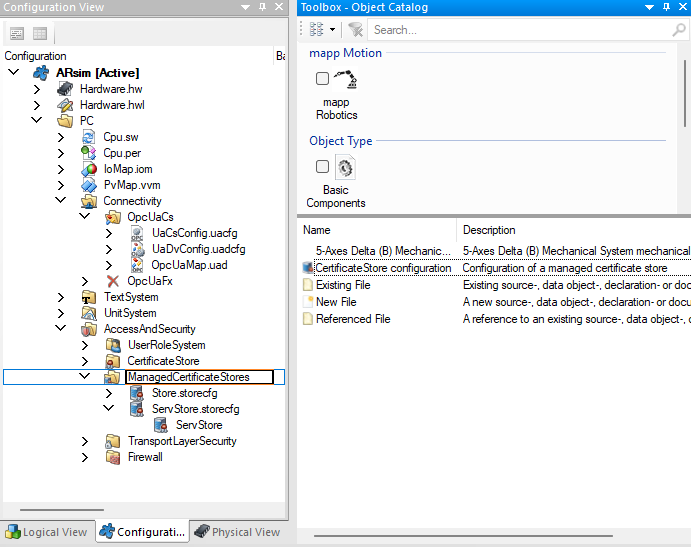
-
Open the new store and fill in its default certificate:
Field Value Key size 1024, 2048 (default, tested) or 4096 (AS editor) Country, Organization Your company Organizational unit Different for each store, for example OPC UA serverandOPC UA userURI urn:<hostname>/BR/. If the CPU has no hostname,urn:<IP address>/BR/. ARsim has none, sourn:127.0.0.1/BR/.DNS names, IP addresses The PLC’s hostname and IP addresses. At least one of the two lists must have an entry. Name of the certificate Default MyCert, 1 to 30 characters, mandatory from AS 6.5 (AS editor definition and B&R Help). It names the certificate and key files on the PLC. Each store has its own folder, so two stores can both keepMyCert(tested).Days Validity in days. Default 365. See the note on expiry below. 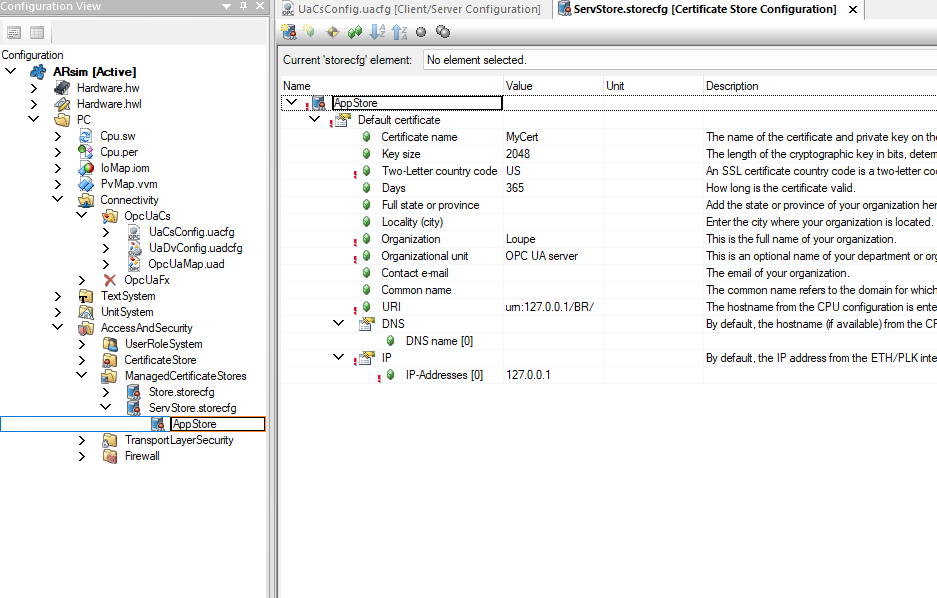
-
Name each store for its purpose. A store has two names in the Configuration View, and only the inner one matters:
- The file, for example
ServStore.storecfg. Renaming it changes only the file name (AS limited it to 10 characters in testing). - The store, the node under the file (
AppStoreat the top of the store editor above). This is the nameUaCsConfig.uacfgselects in steps 3 and 6, and the name of the store’s folder on the PLC. Select the node and press F2 to rename it.
Renaming the store does not update
UaCsConfig.uacfg. The build then fails with error 5509,'AppStore' is an invalid value for property or selector 'AppCertificateStore configuration', because it is not in the selection list, until you select the store again. Name stores before the first transfer: renaming one later gives the PLC a new, empty store (see Recover from a lockout). - The file, for example
In the project, a store is a .storecfg file. The tested application store:
<Element ID="AppStore" Type="StoreCfg">
  <Group ID="ownCertificate">
    <Property ID="keySize" Value="2048" />
    <Property ID="countryCode" Value="US" />
    <Property ID="organization" Value="Loupe" />
    <Property ID="organizationUnit" Value="OPC UA server" />
    <Property ID="uri" Value="urn:127.0.0.1/BR/" />
    <Group ID="dnsNames">
      <Property ID="dnsName[0]" />
    </Group>
    <Group ID="ipAddresses">
      <Property ID="ipAddress[0]" Value="127.0.0.1" />
    </Group>
  </Group>
</Element>
The PLC generates the certificate on the first transfer that contains the store. It does not regenerate it when you change the store’s fields later: in testing, a changed Organizational unit did not reach the certificate after a transfer or a warm restart. To get a certificate with new fields, transfer the changed store and then call ArMcsRecreateCert (library ArMcs; AR 6.4 and OPC UA C/S 6.4 or later, B&R Help) with the store’s name in McsName. Renaming the store also gives a new certificate, but with an empty TrustList (see Recover from a lockout), so keep that for lockouts. In testing, ArMcsRecreateCert made a new certificate with the changed fields, dropped every open OPC UA session while the endpoints restarted, and kept the TrustList, so trusted clients reconnected once they trusted the new PLC certificate.
Watch the expiry date. B&R Help states that if the self-signed default certificate expires before a certificate manager replaces it, Automation Runtime does not recreate it. With the default of 365 days, set Days to cover the machine’s service interval, or plan to replace the certificate through a GDS.
B&R Help requires the unique subjects asked for at the top of this step, but neither the build nor the PLC reports a duplicate: in testing, two stores with the same subject built without a warning, the PLC logged nothing, and every OPC UA test in this guide still passed. Keep the subjects unique anyway, because B&R requires it.
2. Choose the message security
In UaCsConfig.uacfg, under Security → Message Security:
| Setting | Recommended | Why |
|---|---|---|
| SecurityPolicies → None | Disabled | A client on SecurityPolicy None sends no certificate, so the TrustList never applies. In testing, anonymous and user name logins over None still succeeded after the TrustList was set up. |
| SecurityPolicies → Basic256Sha256 | Enabled (default) | B&R recommends it for high security requirements. |
| SecurityPolicies → Aes128_Sha256_RsaOaep | Enabled (default) | B&R recommends it for average security requirements. |
| SecurityPolicies → Basic128Rsa15, Basic256 | Disabled (default) | Deprecated by the OPC Foundation. |
| Modes → Sign | Disabled (default) | Messages are signed but readable by anyone on the network. |
| Modes → SignAndEncrypt | Enabled (default) | Messages are signed and encrypted. |
The PLC offers one endpoint per enabled policy and mode. With the defaults, asyncua found no endpoint for Basic256Sha256 with Sign alone (tested).
Set the same policies under Security → Authentication → SecurityPolicies. These control how a user name and password or a user token is protected in transit.
The Security group is shown in the screenshot in step 3.
Keep SecurityPolicy None enabled for now. The runtime steps below need a SecurityAdmin session over SignAndEncrypt, so keep None until that works, so that existing clients keep running. None cannot be used to manage certificates. Step 5 disables it.
3. Select the application certificate store
In UaCsConfig.uacfg, under Security:
-
Set AppCertificateStore configuration to the application store from step 1.
-
Leave TrustList validation Enabled (the default). It appears only once a managed store is selected.
TrustList validation Effect (tested) Enabled After provisioning, only client certificates in the TrustList can open a secure channel. Disabled After provisioning, every client certificate is accepted. Certificates then encrypt the traffic but do not authenticate the client. The provisioning phase still applies. 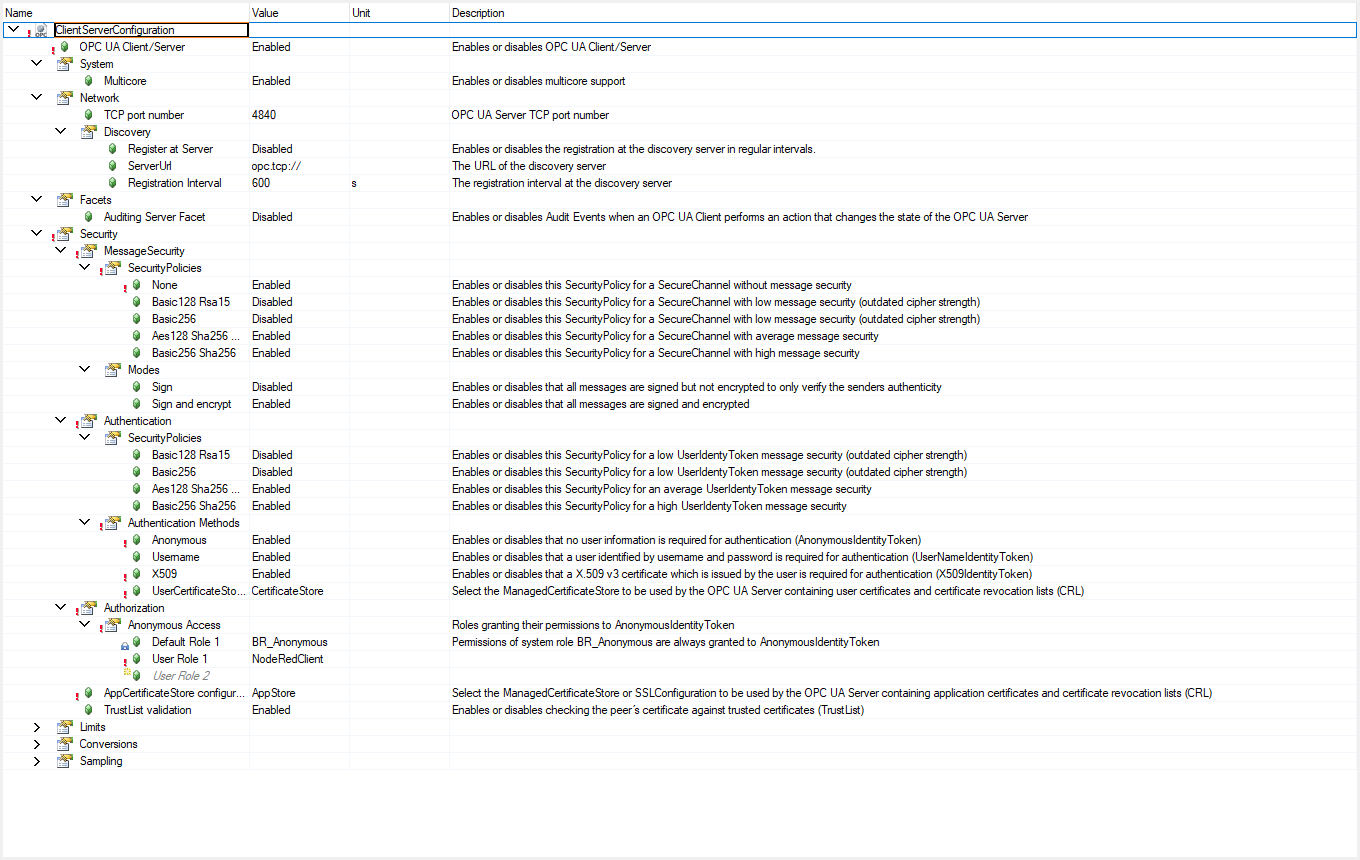
-
Build and transfer.
The PLC now presents the store’s certificate. In testing, its subject was OU=OPC UA server,O=Loupe,C=US, with urn:127.0.0.1/BR/ and 127.0.0.1 in the Subject Alternative Name. Each client must trust this certificate. Most clients ask on the first connect, or store it in a trusted folder. UaExpert (tested with the SecurityAdmin user over Basic256Sha256 and SignAndEncrypt) reports BadCertificateUntrusted and shows the PLC’s certificate. Check the subject against your store, then select Trust Server Certificate:
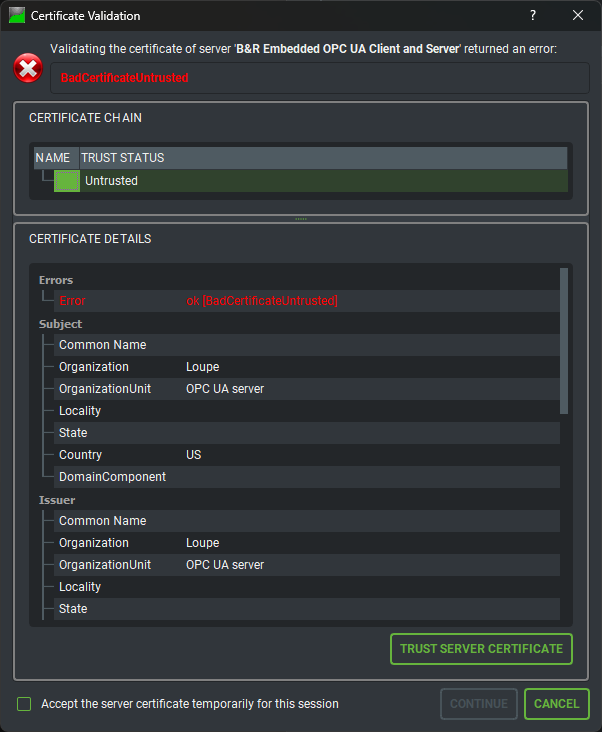
UaExpert then checked that the address it connected to is in the certificate, and reported BadCertificateHostNameInvalid during CreateSession:
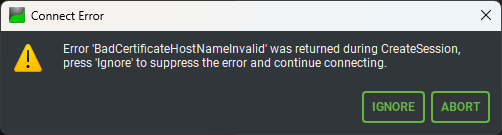
In testing, this happened because the client connected to 127.0.0.2 (a second ARsim), while the certificate listed only 127.0.0.1. Ignore let the connection continue. On a machine, fix it instead: put every hostname and IP address that clients use to reach the PLC into the store’s DNS and IP lists (step 1), transfer, and create a new certificate with ArMcsRecreateCert.
The endpoints are now in the provisioning phase: only BR_SecurityAdmin users can log in, with any client certificate.
4. Trust client application certificates
Log in as the SecurityAdmin user over SignAndEncrypt, and call AddCertificate(certificate, isTrustedCertificate) on the TrustList of DefaultApplicationGroup for each client application. The certificate is the client’s DER-encoded application certificate.
Trust your own admin client first, in the same session. As soon as the TrustList holds one certificate, the provisioning phase ends and every untrusted client is refused, including the one you are using. In testing, the SecurityAdmin user on an untrusted client was refused with BadSecurityChecksFailed.
With asyncua:
import asyncio

from asyncua import Client, ua
from asyncua.crypto.security_policies import SecurityPolicyBasic256Sha256

async def trust_applications(endpoint, admin, password, admin_cert, admin_key, client_certs):
    client = Client(endpoint)
    client.application_uri = "urn:example:trust-tool"   # must match the URI in admin_cert
    client.set_user(admin)
    client.set_password(password)
    await client.set_security(SecurityPolicyBasic256Sha256, admin_cert, admin_key,
                              mode=ua.MessageSecurityMode.SignAndEncrypt)
    async with client:
        trust_list = client.get_node(
            ua.ObjectIds.ServerConfiguration_CertificateGroups_DefaultApplicationGroup_TrustList)
        add = await trust_list.get_child("AddCertificate")
        for path in [admin_cert, *client_certs]:            # DER files; admin client first
            with open(path, "rb") as f:
                await trust_list.call_method(add, ua.Variant(f.read(), ua.VariantType.ByteString),
                                             ua.Variant(True, ua.VariantType.Boolean))
Run it with asyncio.run(trust_applications(...)). admin_cert and the client certificates are DER files. Keep the password out of the script, for example in an environment variable.
To withdraw trust, call RemoveCertificate(thumbprint, true) on the same TrustList, with the certificate’s SHA-1 thumbprint as uppercase hex. In testing, the removed client was refused with BadSecurityChecksFailed on its next connect.
The TrustLists survived, in testing on ARsim:
- a warm restart and a cold restart,
- a project transfer that changed only task code, and
- a project transfer that changed
UaCsConfig.uacfg.
The transfers were made in place, as Automation Studio does it (PVITransfer of the RUC package), not by reinstalling the simulator. A fresh ARsim installation starts empty and back in the provisioning phase.
Recover from a lockout
If no trusted client can log in as SecurityAdmin, for example because the admin client’s key was lost, OPC UA cannot fix it. Removing every certificate does not help either: in testing, an empty TrustList at runtime did not reopen the provisioning phase, and every encrypted client was refused. What was tested on ARsim:
| Action | Result |
|---|---|
| Warm or cold restart, TrustList still holding certificates | Still locked out |
| Warm restart with a TrustList emptied while you still had access | Provisioning phase again |
| Rename the application store in the project and transfer | The PLC deleted the old store’s folder, created a new store with a new certificate, and started in the provisioning phase |
Renaming the store is the reliable route, because a project transfer does not use OPC UA. Rename the store node (step 1) and select it again as AppCertificateStore configuration, or the build fails with error 5509. After the transfer, every client must trust the PLC’s new certificate, and you trust the clients again as in this step. The UaCsConfig.uacfg change also drops certificate-to-role mappings, so repeat step 7.
5. Close SecurityPolicy None and anonymous logins
Once the SecurityAdmin client from step 4 connects over SignAndEncrypt, set SecurityPolicies → None to Disabled under Message Security, and Authentication Methods → Anonymous to Disabled, in UaCsConfig.uacfg. Build and transfer.
Do this before you map user certificates in step 7. A transfer that changes UaCsConfig.uacfg keeps the TrustLists but drops certificate-to-role mappings (see step 7), so every later change to that file means repeating step 7.
6. Enable X.509 user logins
In UaCsConfig.uacfg, under Security → Authentication → Authentication Methods:
- Set X509 to Enabled.
- Set UserCertificateStore configuration to the user store from step 1. This parameter appears only once X509 is enabled. Without a store, the PLC turns X.509 logins off (B&R Help).
- Build and transfer.
The screenshot in step 3 shows X509 enabled and UserCertificateStore configuration = CertificateStore.
The user store is not part of the provisioning phase above, and needs no certificate before other users can log in.
7. Trust a user certificate and map it to a role
A user certificate cannot be assigned to a role in the AS project. At runtime, a SecurityAdmin session over SignAndEncrypt must do both of these:
- Call
AddCertificate(certificate, true)on the TrustList ofDefaultUserTokenGroup. - Call
AddIdentityon the role inServer/ServerCapabilities/RoleSet, with anIdentityMappingRuleTypewhoseCriteriaTypeisThumbprintand whoseCriteriais the certificate’s SHA-1 thumbprint as uppercase hex. Roles from the user role system had NodeIds of the formns=1;s=UserRoles.Roles.<RoleName>on AR 6.6.2. Check the namespace index in the server’s NamespaceArray, or browse the RoleSet by name.
import hashlib
from asyncua import ua

async def trust_user(client, user_cert_der: bytes, role_name: str):
    trust_list = client.get_node(
        ua.ObjectIds.ServerConfiguration_CertificateGroups_DefaultUserTokenGroup_TrustList)
    await trust_list.call_method(await trust_list.get_child("AddCertificate"),
                                 ua.Variant(user_cert_der, ua.VariantType.ByteString),
                                 ua.Variant(True, ua.VariantType.Boolean))
    role = client.get_node(f"ns=1;s=UserRoles.Roles.{role_name}")
    rule = ua.IdentityMappingRuleType(CriteriaType=ua.IdentityCriteriaType.Thumbprint,
                                      Criteria=hashlib.sha1(user_cert_der).hexdigest().upper())
    await role.call_method(await role.get_child("AddIdentity"), rule)
Call it inside the async with client: block of a SecurityAdmin session like the one in step 4. Both steps are needed:
| User certificate state | Result (tested) |
|---|---|
| Trusted and mapped to a role | Session opens with that role’s permissions. Reads succeed. |
| Trusted, not mapped | Session opens, but reading a published variable fails with BadUserAccessDenied. |
| Not trusted | Login refused with BadIdentityTokenRejected (0x80210000). |
From OPC UA C/S 6.5, the PLC persists role identities. In testing on ARsim, the user TrustList entry and the identity both survived a warm restart and a transfer that changed only task code.
A transfer that changes the OPC UA configuration drops the certificate-to-role mappings. In testing, after a transfer with a changed UaCsConfig.uacfg, the OPC UA server restarted, the user certificate was still trusted, but its Thumbprint identity was gone from the role. The user could still log in, and every read failed with BadUserAccessDenied. It happened both times it was tried. Run the AddIdentity step again after such a transfer, or script it as part of commissioning.
A fresh ARsim installation starts empty.
8. Log in with the user certificate
The client sends the user certificate and signs with its private key. With asyncua:
import asyncio

from asyncua import Client, ua
from asyncua.crypto.security_policies import SecurityPolicyBasic256Sha256

async def login(endpoint, app_cert, app_key):
    client = Client(endpoint)
    await client.set_security(SecurityPolicyBasic256Sha256, app_cert, app_key,
                              mode=ua.MessageSecurityMode.SignAndEncrypt)
    await client.load_client_certificate("user.der")   # user certificate, not the application certificate
    await client.load_private_key("user-key.pem")
    async with client:
        print(await client.get_node(ua.ObjectIds.Server_ServerStatus_State).read_value())

asyncio.run(login("opc.tcp://<plc>:4840", "app.der", "app-key.pem"))
The application certificate (app_cert) must be trusted as in step 4. In testing, a trusted user certificate also logged in over SecurityPolicy None, which is one more reason to disable None.
Verification
- Read
Objects/Server/VendorServerInfo/Endpoints/Endpoint/CommissioningModeActive(namespace 1 forVendorServerInfo’s children) as the SecurityAdmin user.Falsemeans the provisioning phase is over. It readTruebefore the firstAddCertificateandFalsestraight after it. - Run this matrix. The results are from testing, with Basic256Sha256 and SignAndEncrypt unless stated:
Client Login Expected result Trusted application User name, or trusted and mapped user certificate Connects Untrusted application Any, including SecurityAdmin BadSecurityChecksFailed (0x80130000)Trusted application Untrusted user certificate BadIdentityTokenRejected (0x80210000)Trusted application Trusted user certificate not mapped to a role Connects; reads fail with BadUserAccessDenied (0x801F0000)Any, on SecurityPolicy None Anonymous or user name Connects, if None is enabled Any, during provisioning Anything but SecurityAdmin BadUserAccessDenied (0x801F0000)
Troubleshooting
| Symptom | Cause | Fix |
|---|---|---|
Every login except the SecurityAdmin fails with BadUserAccessDenied, right after the store was added |
The application store is in the provisioning phase | Trust at least one client certificate (step 4) |
SecurityAdmin is refused with BadSecurityChecksFailed |
Its client certificate is not in the TrustList, and provisioning has ended | Connect from a client that is trusted. If none is, see Recover from a lockout. The Connectivity logbook names each refused client: BadCertificateUntrusted, Subject: /CN=<application URI>/.... |
AddCertificate or reading CommissioningModeActive fails with BadSecurityModeInsufficient (0x80E60000) |
The session uses SecurityPolicy None. The SecurityAdmin user can log in over None, but cannot manage certificates (tested on both TrustLists). B&R Help states the same SignAndEncrypt requirement for the RoleType methods such as AddIdentity. |
Log in as a BR_SecurityAdmin user with SignAndEncrypt |
| X.509 logins are never offered or always refused | X509 not enabled, or no UserCertificateStore configuration | Step 6 |
Certificate login opens but reads fail with BadUserAccessDenied |
The certificate is trusted but not mapped to a role, or a transfer changed the OPC UA configuration and dropped the mapping | AddIdentity (step 7) |
| Unknown clients still connect | SecurityPolicy None is enabled, or TrustList validation is off | Steps 3 and 5 |
Build error 5509: '<name>' is an invalid value for property or selector 'AppCertificateStore configuration' (or UserCertificateStore configuration) |
A store was renamed, and UaCsConfig.uacfg still holds the old name |
Select the store again in UaCsConfig.uacfg |
A client reports BadCertificateHostNameInvalid |
The address the client connects to is not among the certificate’s DNS names and IP addresses | Add it to the store’s DNS or IP list, transfer, and call ArMcsRecreateCert (step 1) |
| A client asking for Sign alone finds no endpoint | Sign mode is disabled by default | Use SignAndEncrypt, or enable Sign |
| Errors from the managed certificate store at startup | For example, bad URI, DNS or IP entries | B&R lists the managed certificate store errors under AR system errors 1076901302 to 1076901351 and -2144324170 to -2144324121. A duplicate subject raised no error in testing. |
| The PLC’s certificate still shows old field values | The PLC generates it only once per store | Transfer the change, then call ArMcsRecreateCert (step 1) |
Before you use this on a machine
- Disable SecurityPolicy None and the Anonymous authentication method, and leave Sign disabled.
- Keep TrustList validation enabled.
- Use a dedicated BR_SecurityAdmin user with a strong password, and use it only for certificate management.
- Self-signed certificates encrypt and identify a known peer, but prove nothing on their own. For a fleet, register the PLC with a GDS that supports push management (B&R names Unified Automation’s UaGDS). The PLC does not support pull management, and all its endpoints share one certificate and one TrustList (B&R Help).
- Plan certificate renewal. The PLC does not recreate an expired self-signed default certificate, and every client must trust a new one. The
ArMcsRecreateCertfunction block recreates it from the application, which drops all client connections briefly. - After any transfer that changes the OPC UA configuration, map user certificates to their roles again (step 7).
Related
- Trigger Node-RED flows on B&R PLC variable changes (OPC UA): a worked client, with a user certificate login for Node-RED.
- B&R Help, OPC UA C/S configuration: HelpID 5450009, and its “Security” page (
3daad4ba-8150-4dac-8266-ac9781f97aae). - B&R Help, TLS/SSL managed certificate store:
ccf00e38-5ddd-481c-a096-1b32e2758461. - B&R Help, OPC UA C/S Certificate Management:
bd6231c8-5de7-4224-9044-249a33c8bf33, with its “Provisioning” and “Server certificate renew” pages. - B&R Help, RoleType:
4285ed6f-26da-4408-af86-f77ffaefe4d1. Well-Known Roles:3fcf0f57-9b1b-4915-97c1-3d3a3c472410. - OPC UA specification Part 12 (Discovery and Global Services: certificate groups and TrustList) and Part 18 (Role-Based Security).